Projects and workflows
Some work does not fit in a single ticket. Use a project for multi-week client work with several people, and a workflow for a checklist you run the same way every time, such as onboarding a new starter.
Projects
Operations › Projects tracks client projects such as onboarding a new client, a migration or a rollout.
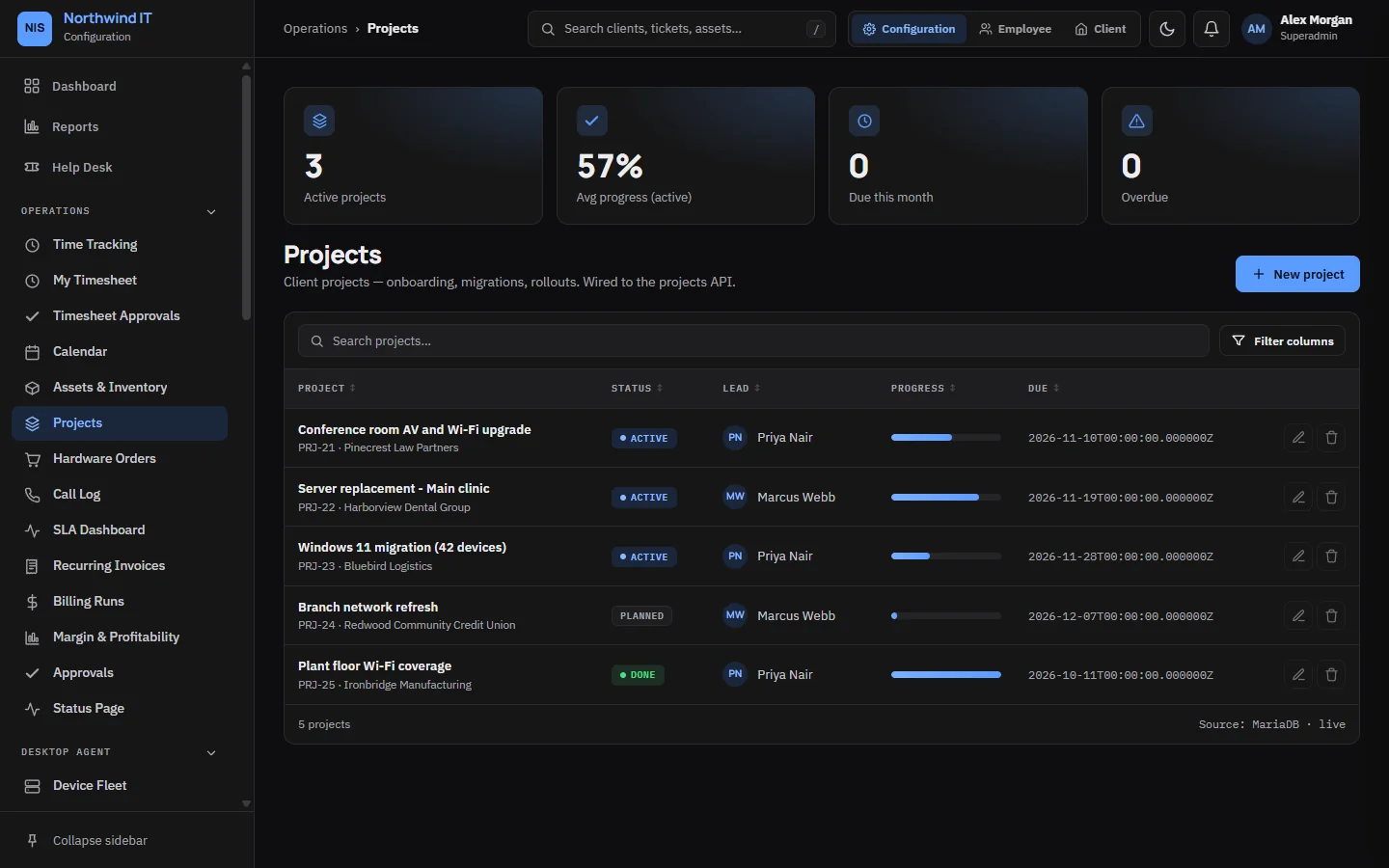
Each project has a client, a lead, a due date, a budget, a progress figure and a list of tasks with owners. Tasks can carry comments.
- Use a project when work spans weeks and more than one person. Use tickets for everything else.
- Tie project work to tickets so time lands in one place and the client sees progress.
- Record the quote or contract the project is delivered under, so scope can be checked.
- Close a project properly: update the client's documentation, hand over and note what you learned.
Project templates in Configuration › Templates start a new project with its usual task list.
Workflows
Workflows turns a starter or a leaver at a client into a tracked checklist. Each workflow starts from a template matched to the kind of client, has an owner and a due date, and records when each step was done.
Onboarding a starter
- Start the workflow from the matching template.
- Confirm the details with the client: name, role, start date, manager, systems and hardware.
- Work the checklist: mailbox and licence, security groups, MFA enrolment, device build, vault access.
- Record the device in assets and assign it to the user.
- Hand over a short written summary of what they have and how to get help.
Offboarding a leaver
- Start the workflow the day you are told.
- Disable sign-in first. Do not delete the account.
- Revoke sessions and tokens, remove MFA devices and remove vault and shared-credential access.
- Handle the mailbox as the client instructs.
- Recover, wipe and re-image hardware, and update the asset record.
- Rotate shared credentials the person knew, and note which ones on the ticket.
- Reclaim licences so the client stops paying for them.
- Close the workflow. The completed checklist is the client's record.
Workflow templates
Workflows › Workflow Templates holds the master checklists. Improving a template improves every workflow started from it afterwards.
- Make each step checkable: "MFA enrolled and tested", not "security done".
- Order steps by dependency.
- Link the runbook or article for a step instead of repeating it.
- When a live workflow is missing a step, fix the template the same day.